Bundle Settings
This page explains the Bundle Settings options used by Product Bundle on single product pages.
How to access Bundle Settings
In WordPress, go to Site Settings → Bundle Settings.
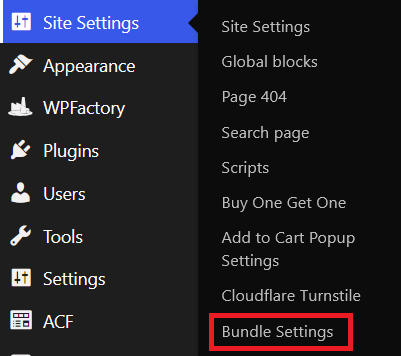
Use these controls to manage validation, labels, bundle card behavior, and summary/tracking display.
1. Color Selection Validation
Use this group to control how variable bundle items handle unavailable colors.
| Setting | What it does |
|---|---|
| Color selection validation | Prevents unavailable colors from being selected and shows a warning if no valid color is chosen. |
| Warning text when no color is selected | Custom warning text shown before add-to-cart when a required variation is missing. |
2. Bundle Card Behaviour
Use this group to control the bundle cards displayed on product pages.
| Setting | What it does |
|---|---|
| Bundle card behaviour | Enables the controls in this section. |
| Auto-select first available color for required items | Preselects the first in-stock color for required variable items. |
| Show product categories on bundle cards | Shows/hides category text under item titles. |
| Open bundle item links in a new tab | Opens item links in a new browser tab. |
| Section heading above bundle items | Optional heading above the bundle card area (example: “Build your set”). |
| Highlight this section | Adds visual highlight styling to the bundle area. |
| Color label text | Label shown before selected color value (default: “Color”). |
| Color dropdown placeholder text | Default dropdown text before selection (default: “Choose color”). |
3. Bundle Summary and Tracking
Use this group to control the live summary block below bundle items.
| Setting | What it does |
|---|---|
| Bundle summary and tracking | Enables summary and tracking controls in this section. |
| Show bundle summary block | Shows/hides the summary area. |
| Summary title (optional) | Optional summary heading. Leave empty to hide it. |
| Show selected item count | Shows the number of selected bundle items. |
| Selected item count label | Text label before the count value. |
| Show estimated extra cost | Shows running extra cost for selected items. |
| Estimated extra cost label | Text label before the cost value. |
| Track bundle interactions (analytics) | Enables bundle interaction tracking for analytics reporting. |
Recommended setup
For most stores:
- Turn on Color selection validation.
- Turn on Bundle card behaviour.
- Turn on Bundle summary and tracking.
- Keep default labels first, then localize them after review.