Google Analytics 4 (GA4)
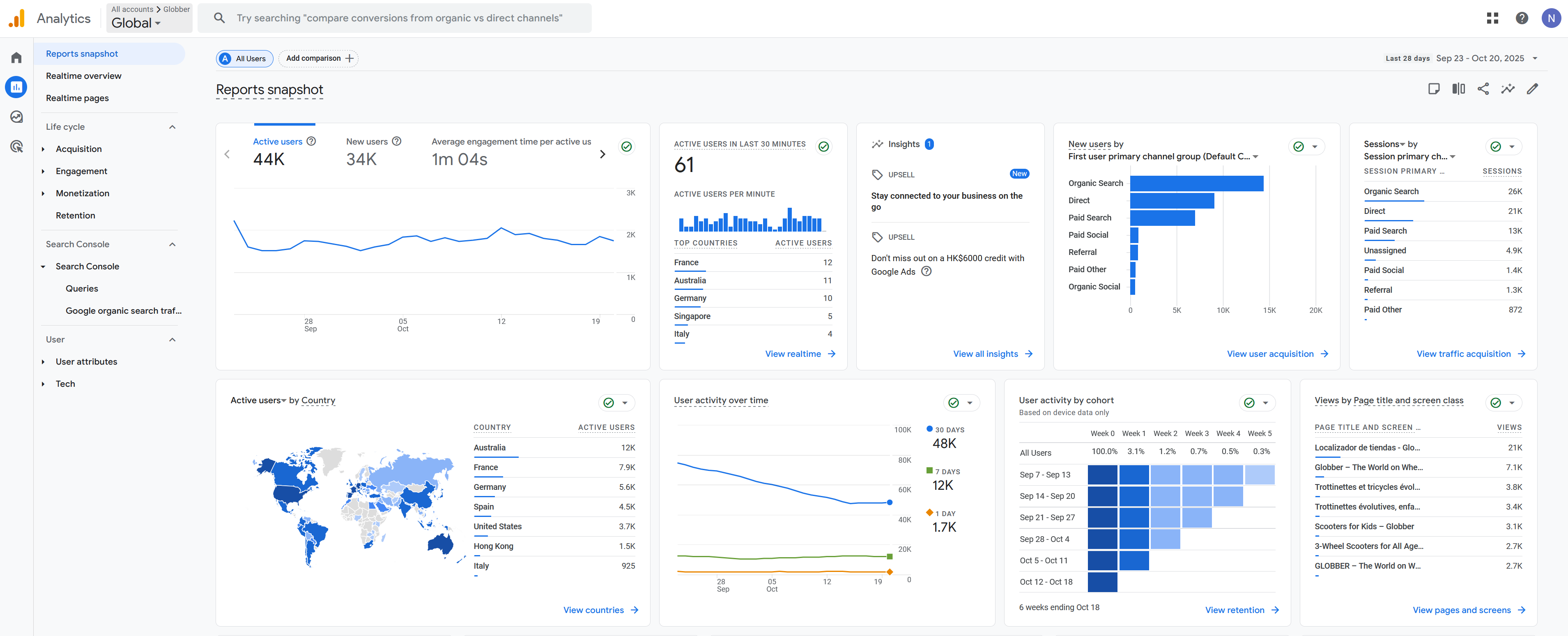
Google Analytics 4 (GA4) tracks visitor behavior on your Globber website.
Get Access
Contact the Globber IT team to access your GA4 dashboard (request form link coming soon)
What GA4 Shows You
- Visitor numbers and page views: How many people visit your site daily and which pages they look at most
- Customer shopping behavior: What products customers view, add to cart, and purchase
- Marketing campaign performance: Which ads, emails, or social media posts bring visitors to your site
- Mobile and desktop usage: How many visitors use phones vs computers to browse your site
- E-commerce conversions and revenue: How much money your website makes and which products sell best
Why GA4 is Important
GA4 helps you make better business decisions by showing you what's working and what isn't:
- Save money on advertising - See which ads bring customers and stop wasting money on poor performers
- Improve your website - Find pages where visitors leave and fix the problems
- Increase sales - Understand what customers want and give them more of it
- Plan for the future - Use data trends to predict busy periods and stock levels
- Beat competitors - Know your customers better than other companies do
Without GA4, you're making business decisions blind. With it, you make smart choices based on real customer behavior.
How to Access?
- Email the IT team - Send them your request for GA4 access
- Wait for setup - They will create your account (takes 1-2 days)
- Check your email - You'll get login details from Google
- Go to analytics.google.com - Type analytics.google.com in your web browser
- Sign in - Use the login details from your email
- View your data - You'll see your website information
Need help?
Contact the Globber IT team for assistance with your analytics data.
Learn More
Visit Google's resources:
- Google Analytics 4: Introducing the next generation of Analytics
- Google Analytics Training Course: Get Started
- Analytics Help Center: Visit Support